AI Project: the basic pipeline to ship your local project
You've generated code with AI. It runs locally. Now what? Claude Code, GitHub, Vercel, a domain name: the 4 building blocks to go from prototype to live website.
The problem
You've spent 2 hours with Claude or ChatGPT. You've got a site, a tool, an app running on your computer. You show your screen to someone: "look, it works". But it only works on your machine. Nobody else can access it.
And most people stop there. Not because they don't want to keep going. Just because they're missing the 4-5 concrete steps to go from "it works on my machine" to "here, click this link".
Who is this article for?
Not for developers. Not for someone who's never touched a computer either. This article is for you if:
- You've already used Claude, ChatGPT or Cursor to generate code
- You have a project running locally and want to put it online
- You're not a dev but you're not afraid to open a terminal
If you don't know what a terminal is, start there. This article assumes you've already taken your first steps with generative AI.
The 4 building blocks
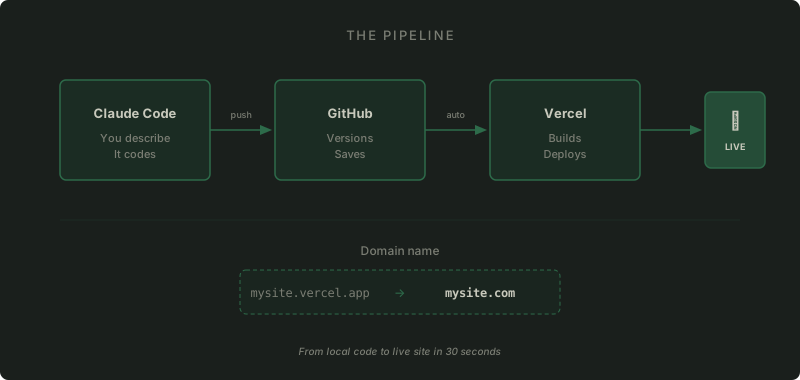
You need 4 tools. Each has a specific role, and they connect in this order:
- Claude Code to write code (and fix, and test)
- GitHub to save and version
- Vercel to deploy automatically
- A domain name to have a real URL
Claude Code
This is the AI that codes for you. But unlike a simple chatbot, Claude Code doesn't just generate text: it creates files, runs commands, tests, fixes. It's pair programming with a machine.
Three ways to use it:
- On claude.ai directly in your browser. You create a project, you chat, it codes. No installation needed. This is the simplest entry point.
- CLI (command line) in your terminal. More powerful, faster. Claude has access to your filesystem, it can do everything: create, modify, run commands, push to GitHub. This is what I use daily.
- In VS Code via the extension. Good middle ground if you want to see code change in real-time.
My recommendation: start on claude.ai if you've never opened a terminal. Move to CLI once you're comfortable. That's where the real power unlocks.
GitHub
First reflex once your code works: save it on GitHub.
GitHub is not a dev thing. It's versioning. Concretely: every time you make a change you're happy with, you make a commit. A commit is a snapshot of your project at a given moment. "Added contact page", "Fixed mobile header", etc.
Why it's essential: because you will break things. You'll ask Claude to change something, it'll break something else. With GitHub, you roll back in one command. Without GitHub, you start from scratch.
The other benefit: it's the link with Vercel. Every push to GitHub triggers an automatic deployment. More on that next.
The 4 key concepts:
- Repo: your project on GitHub. One repo per project.
- Commit: a save point with a message describing the change.
- Push: sending your commits to GitHub.
- Pull Request (PR): a review step before applying your changes. Optional when working solo, but useful for keeping a clean history.
In practice, Claude Code handles all of this for you. You tell it "commit and push", it does it.
Vercel
Vercel turns your code into a website accessible by anyone.
The principle: you connect your GitHub repo to Vercel. Takes 2 minutes, it's a button. From there, every push to GitHub triggers a deployment. Vercel takes your code, compiles it, and puts it online at a URL like my-project.vercel.app.
It's free for personal projects. No server to configure, no DevOps, nothing. You push, it's live.
Bonus: each Pull Request generates a preview URL. You see exactly the result before going to production.
The domain name
At this point, your site runs on my-project.vercel.app. It works, but it's not professional. You want mysite.com.
You buy a domain from a registrar (OVH, Gandi, Namecheap, or directly from Vercel). Then you modify the DNS: it's the directory that says "when someone types mysite.com, send them to Vercel". Two lines to change, Vercel tells you exactly which ones. Done once, never touched again.
What you need before starting
Before jumping in, make sure you have:
- A Claude account (claude.ai) with a Pro or Max subscription
- A GitHub account (free)
- A Vercel account (free, connected to GitHub)
- A domain name if you want a custom URL (around 10 euros/year)
That's it. No need to install Node.js, Python, Docker or anything to get started on claude.ai. Local installation will come naturally when you're ready for CLI.
The daily workflow
Once everything is connected, here's what it looks like:
- You open Claude Code
- You describe what you want in plain language: "add a blog", "change the header color"
- Claude writes the code, you see the result locally (or directly in the browser)
- You push to GitHub
- Vercel deploys automatically
- It's live
This morning, I did exactly that from my phone on the commuter train. Claude Code on claude.ai, push to GitHub, Vercel deploys. The site was updated before I arrived in Paris.
What's next?
This pipeline is the foundation. Once it's in place, you can start using the real Claude Code power tools: skills, agents, sub-agents, MCP servers. But without this base -- a clean repo, a working deploy, a clear workflow -- those tools are useless. It's like trying to customize a car that has no wheels.