Building your Skills library
Organize, name, nest and maintain your Claude Code Skills. The guide to going from 3 scattered Skills to a structured library.
The moment it overflows
You've created your first Skills. One for writing X posts. One for auditing a landing page. One for your research. They work. You use them every week.
Then you create a fourth, a fifth, a tenth. The names become inconsistent. audit-site, my-audit, landing-review, three names for the same thing. You don't know which is the right one. You open the wrong one, the result isn't what you expected, you waste 5 minutes finding the right one.
This is the moment to structure. Not before (useless with 2 Skills), not after (chaos is already installed).
The category:name convention
The first lever is naming. Not files thrown together, but a systematic convention: category:name.
The category is the domain. The name is the action. writing:coach, research:digest, mktg:cro-audit. By reading the name, you know what the Skill does without opening it.
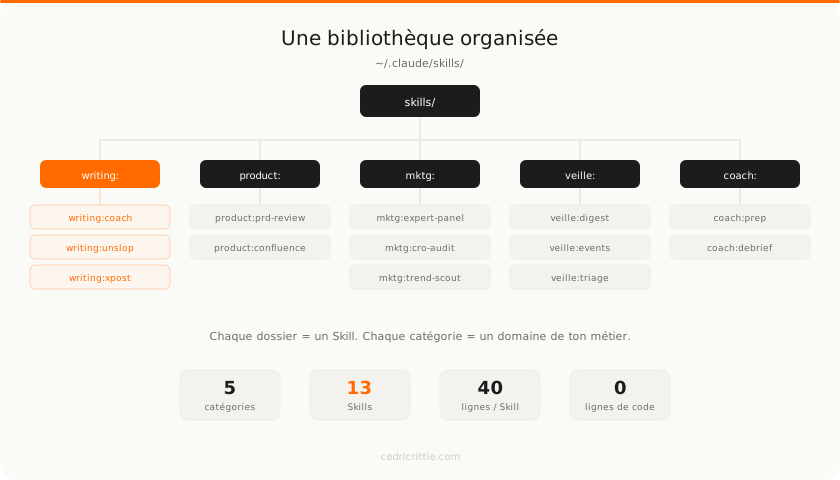
Categories emerge from your job. A CPO will have product:, mktg:, coach:. A content lead will have writing:, social:, seo:. A startup founder will have product:, ops:, pitch:.
No need to plan categories in advance. They appear naturally. You create your first research Skill, call it research:digest. You create a second, research:events. The research: category now exists.
The conventions that matter:
| Rule | Why |
|---|---|
| Always lowercase | No ambiguity between Audit and audit |
| Singular category | writing: not writings: |
| Name = verb or action | :digest, :audit, :draft, not :my-thing |
| One Skill = one task | If the Skill does 3 different things, that's 3 Skills |
The meta-Skill: a Skill that creates Skills
The most useful Skill in your library isn't a business Skill. It's /skill:create.
You tell it what you want to automate, it creates the folder, the SKILL.md file, the frontmatter, and the structure. It applies your naming conventions. It asks about necessary permissions. In 30 seconds, the Skill is ready.
/coach:prep [client name].The meta-Skill knows your conventions because they're written in its own SKILL.md file. The category:name format, folders in the right directory, the frontmatter template. You don't reinvent the wheel with each new Skill.
It's exactly the same principle as a document template in Google Docs or Notion. Except the template is active: it doesn't wait for you, it guides you.
Nested Skills: when a Skill calls others
A Skill doesn't need to do everything itself. It can orchestrate other Skills.
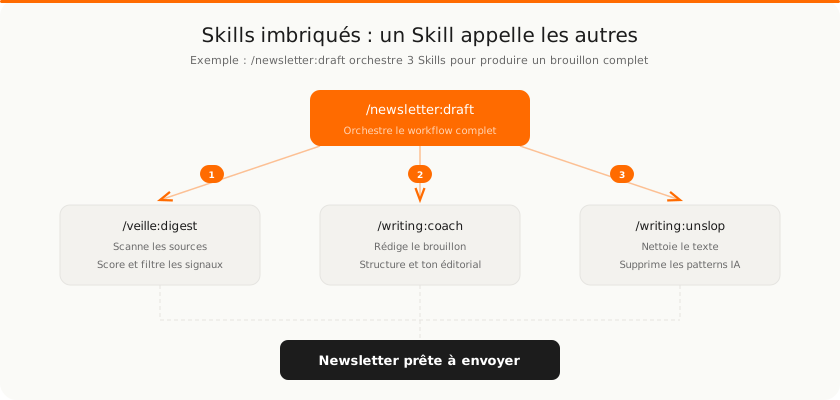
/newsletter:draft doesn't know how to do research. It doesn't know how to write in your voice. It doesn't know how to clean AI patterns from text. But it knows in what order to call the Skills that do.
Step 1: it invokes /research:digest to scan the best sources of the week and produce a selection of signals.
Step 2: it passes those signals to /writing:coach which drafts the content in the newsletter's format and tone.
Step 3: it runs the text through /writing:unslop which removes AI patterns and empty phrasing.
Result: a newsletter draft ready for review. Three specialized Skills, orchestrated by a fourth.
The principle: each Skill does one thing well. Nesting creates complexity without each Skill becoming a 200-line monster.
It's the same logic as functions in programming: small reusable blocks that you combine. Except here, the blocks are plain text markdown files.
Obsidian as cockpit
Skills are markdown files. Obsidian is a markdown file editor. The connection is natural.
The trick: store Skills in your Obsidian vault and create a symbolic link to ~/.claude/skills/. You edit in Obsidian, Claude reads the same file.
~/Documents/Vault/Skills/
  writing:coach/SKILL.md
  writing:unslop/SKILL.md
  research:digest/SKILL.md
  ...

~/.claude/skills/ → symlink to ~/Documents/Vault/Skills/
What this changes:
- Search: you search "audit" in Obsidian, you find all your audit Skills in one second
- Visual editing: you modify a Skill with markdown preview, not in a code editor
- Links: you can link a Skill to a project note, a meeting summary, a brief
- History: Obsidian Sync or Git gives you versioning for free
You no longer see Skills as config files hidden in a system folder. You see them as work documents, next to your notes, briefs, and projects.
Maintaining your Skills
A Skill is never finished. It evolves with your usage.
The first version does 80% of the job. You use it for a week, notice it forgets to check a criterion. You add a line. It generates output that's too long. You adjust. It uses a tone that's too formal for a specific client. You add an exception.
/mktg:cro-audit
15 lines. 4 evaluation criteria. Basic output format.
Result: useful but incomplete. It forgets mobile and load time.
/mktg:cro-audit
45 lines. 8 criteria. Weighted scoring. Industry benchmarks. P0-P3 priorities.
Result: a complete audit that takes 2 minutes instead of 2 hours.
The maintenance cycle:
- Use the Skill as-is
- Note what's missing or wrong
- Fix the SKILL.md file (one line, one rule, one criterion)
- Reuse and verify the improvement
It's 5 minutes of correction for hours of cumulative gain. The Skill sharpens over time, like a brief that gets more precise with each round of feedback.
The complete system
You now have three layers that form a complete productivity system.
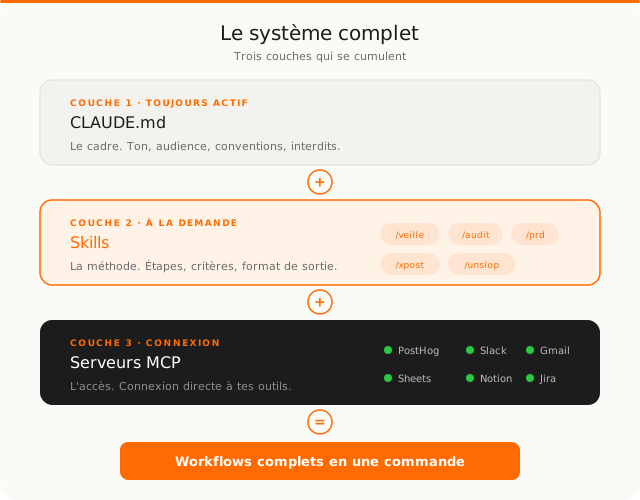
CLAUDE.md sets the frame. It's always active, loaded at every session. Tone, audience, conventions, constraints. Claude knows who it is and who it works for.
Skills define the methods. They're activated on demand, when you type /skill-name. Each Skill encapsulates a complete workflow: steps, criteria, output format.
MCP servers provide access. They connect Claude to your external tools. PostHog for analytics, Slack for communication, Gmail for email, Jira for the backlog.
All three layers stack. When you type /newsletter:draft, Claude applies the CLAUDE.md conventions (tone, constraints), executes the Skill's method (scan, write, clean), and accesses data through MCP servers (Web Search, Gmail, Slack).
One command. Three layers. A complete result.
Where to start
- List the 5 tasks you do most often with Claude
- Turn the first one into a Skill (use
/skill:createif you have it) - Pick 2-3 categories that match your role
- Use the Skill for a week, note what's missing
- Fix it, add the second Skill, and iterate
Don't plan 20 Skills at once. Start with one. Use it. Fix it. Add the next when a concrete need arises. After a month, you'll have a library that reflects exactly how you work.