The quota wall: why your plan runs out mid-week
Claude Code context management: the 4 moves that keep you from hitting the quota wall and keep responses sharp Monday through Friday.
When Claude tells you stop
Tuesday, 5pm. You're deep in a session that's flowing. You send the next message.
You've hit the limit on your Claude Max plan.
Reset at 10:00pm.
Cut off. Right in the middle of something you can't resume tomorrow morning. And you don't get why. You've only used Claude once this week.
The reason isn't your message count. It's the weight of each message. Every time you send a question, Claude re-reads everything that's been said before. A 3-hour conversation that's accumulated 150K tokens means 150K tokens charged to your quota at every new turn. The counter emptied in silence while you worked.
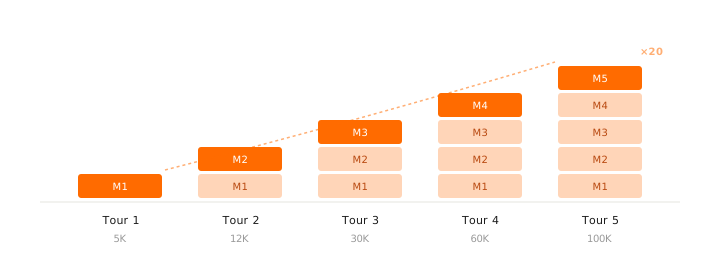
Same root cause, different symptom: Claude starts getting wrong a convention you set 2 hours ago. It re-suggests something you already fixed. It gets strangely more generic. Not a coincidence. Every LLM loses precision as its context grows (Chroma 2025 study on 18 models, no exception).
The paradox: the tool lets you load everything. Your instinct pushes you to do it. You pay twice. In quota burned, and in quality drifting.
Double jeopardy: quota burning, quality drifting
Both problems share one cause: context inflating without control. But you feel them at different moments.
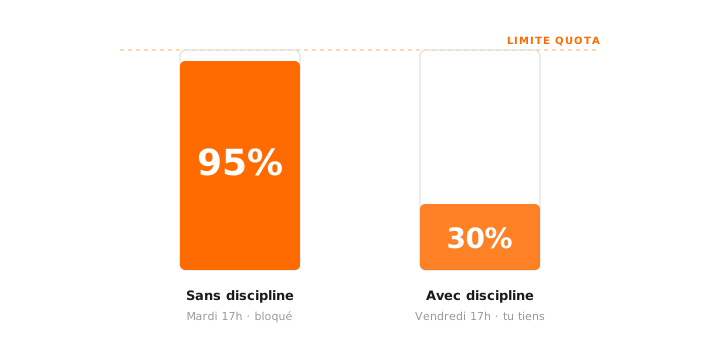
Problem #1: the quota that snaps.
Claude Pro, Max, ChatGPT Plus, Cursor Pro: they all have usage limits, not just prices. Messages per 5 hours, sessions per week, monthly "fast requests", each with its own metric. A conversation that's piled up 150K tokens costs 5 to 10 times more than a clean 20K one. You feel like you've done a normal morning. Your counter knows you've just burned three days of runway.
Problem #2: the quality that slides.
The longer the conversation, the more the model drifts. It forgets a convention you set at 9am. It re-proposes a thing you fixed at 11am. Responses get smoother, more generic, more cautious. The degradation starts well before the technical limit: you feel it by 60 to 70% fill.
A 4-person meeting decides. A 20-person meeting discusses. An AI's context is the same: the more people in the room, the less each voice counts.
If you're on the API with usage-based billing, it's the same story in cash: every re-read token gets fully billed. The principle doesn't change, only the counter does.
The 4 moves to manage your context
Context discipline comes down to four verbs. AI engineers use them every day, but they speak to anyone who's ever managed a heavy folder.
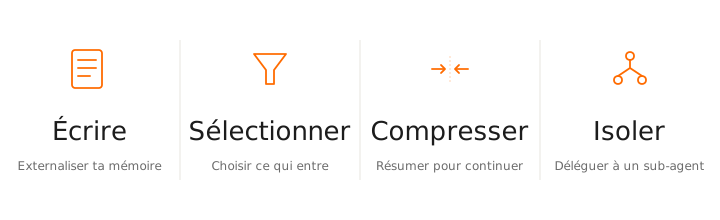
1. Write: externalize your memory
Permanent rules, baseline decisions, recurring briefs shouldn't live in the conversation. They should live in files Claude re-reads on demand. Three layers stack together. The third one, the one most people never activate, is what really changes the game.
@-referencing your markdown files. Claude then taps into years of notes, product decisions, client briefs, editorial conventions. A memory far bigger than any CLAUDE.md can carry, and one that follows you from project to project.Written once, read on demand. The pivot is the third layer: most users stop at CLAUDE.md. Those who connect their second brain are talking to a Claude that knows their history.
2. Select: choose what enters the context
Every token you paste into the prompt gets re-read on every turn. So you pick what enters, you don't dump and hope Claude sorts. Three levers, one concrete example each.
Going further: a Skill that identifies the 2-3 useful files before starting a task. You run it first, you walk in with the right material, you avoid the "dump everything, we'll see" reflex.
3. Compress: the commands to know
Compression is what lets you go long without losing everything or paying for everything. Three commands to master in Claude Code.
Auto-compact triggers at 80%. That's "I did nothing" mode: you've already burned 80% of your quota, and you have no control over what it chooses to summarize.
4. Isolate: delegate to a sub-agent
Noisy tasks (reading a long file, broad web research, exploring a codebase) have no business in your main conversation. They inflate the context for a result that fits in three lines. A sub-agent does the work in its own context and hands you only the conclusion.
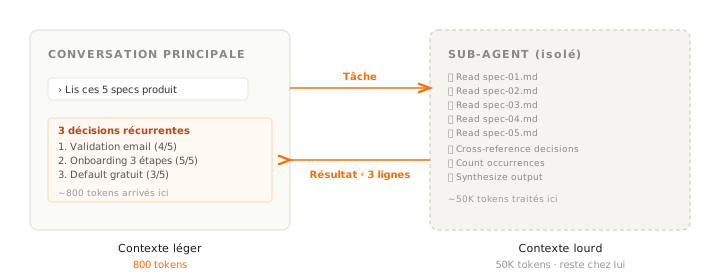
The noise stays in the sub-agent. Only the result crosses the boundary back to the main conversation. Your quota only sees the 800 tokens that matter.
Covered in depth in an upcoming article on the path.
The four moves work together. In a good session, you use them all, at different moments.
Your daily Claude Code routine
The 4 moves are the theory. Here's what it looks like in practice when you finish a phase and move on.
Three characters, two seconds, a quota saved. To repeat every time the topic shifts. That single move is the difference between a week that holds and a Tuesday 5pm blocked.
3 mistakes that blow up your quota
Three traps that burn quota without giving anything back.
You wait for Claude to say "context full". Auto-compact fires at 80% fill. By then, you've already burned 80% of your quota, and it summarizes according to its own logic, not yours.
/compact keep the editorial conventions and the brief, summarize the rest
Triggered manually, with explicit instructions on what must stay in detail.
You finish a client brief. You go straight into a site audit. Same session, same conversation. The brief is useless for the audit, but it's re-read on every turn anyway.
/clear between two unrelated topics.
Your CLAUDE.md reloads, your context starts clean, your quota too.
You want Claude to analyze a 30-page document. You paste it in the prompt. On every subsequent turn, the 30 pages get re-read, even when you've moved on to another subject.
@q2-report.md in Claude Code or Cursor, or accessible through an MCP.
Claude reads the file once, extracts what it needs, and leaves it alone.
ChatGPT, Cursor, Claude Code: the same principle
The frame doesn't change when you change tools. What changes is how much control you get.
| Tool | CLAUDE.md equivalent | /clear equivalent | Fine control |
|---|---|---|---|
| Claude Code (Pro, Max) | CLAUDE.md + Skills | /clear | Compact, sub-agents, caching |
| ChatGPT (Plus, Team, Pro) | Projects + Instructions | New conversation | No manual compact |
| Cursor (Pro) | .cursorrules + @Codebase | New conversation | Limited to select (@file) |
ChatGPT: the GPT-5 usage limit snaps silently, often after 2-3 hours of intense sessions. No compression tool. The discipline happens at "when do I open a new conv" and on the density of your Projects instructions.
Cursor: monthly "fast requests" counter drains fast if you leave @Codebase on permanently. Use @file targeted instead of @Codebase all the time.
Claude Code: the most granular of the three. It's also the one that shows your weekly quota in real time if you're on Max. Training yourself to glance at it before a long session is the equivalent of checking the fuel gauge before a long drive.
The reflex to keep
Context is a resource, not a dumping ground.
Before piling on a file, a long excerpt, a new topic in your conversation, the question to ask yourself is simple: does this really need to be here? If the answer is no, you route it through CLAUDE.md, a Skill, an @ reference, or a sub-agent. Anything but pasting.
Open your latest big Claude Code conversation. If it's past 50% of the context, run /compact with explicit instructions on what must stay.
Tomorrow morning, you'll start from 20K tokens instead of 150K. And you'll notice right away the difference in response quality.
After a week, it becomes a reflex. You stop thinking about it. You just notice that you finish the week without hitting the wall, and that Claude stays sharp Friday evening the way it was Monday morning.
Next step on the path: agents and sub-agents, which formalize the fourth move (isolate) and turn delegation into a repeatable workflow.